
CHAPTER 05 · 고객 문의 6번
05. Push·Merge 제한과 Secret 차단
고객 문의 — Restrict push and merge, push rules, block secret push 기능 상세 — 실제 데모 혹은 화면이라도 어떻게 구성되어 있는지 확인이 가능하면 좋겠습니다.
요약 답변
문의하신 세 가지는 서로 다른 계층의 기능입니다. 표로 구분해서 설명하는 것이 가장 명확합니다.
| 기능 | 무엇을 막는가 | 동작 지점 | 티어 |
|---|---|---|---|
| Branch rules / Protected branches | 보호 브랜치에 대한 직접 push, merge 권한, force push, 삭제 | push·merge 시 권한 검사 | Free부터 (세부 지정·그룹 단위는 Premium) |
| Push rules | 커밋 메시지 형식, 브랜치 이름, 작성자 이메일, 금지 파일명, 파일 크기, 서명 여부, 비밀 파일명 | pre-receive (push 수신 시) | Premium 이상 |
| Secret Push Protection | API 키·토큰 등 비밀 값 내용이 포함된 push | pre-receive (내용 스캔) | Ultimate |
즉 "push를 어디에/누가"는 Branch rules가, "push에 담긴 커밋이 규칙에 맞는지"는 Push rules가, "push에 비밀 값이 섞여 있는지"는 Secret Push Protection이 담당합니다.
05-1. Restrict push and merge (Branch rules / Protected branches)
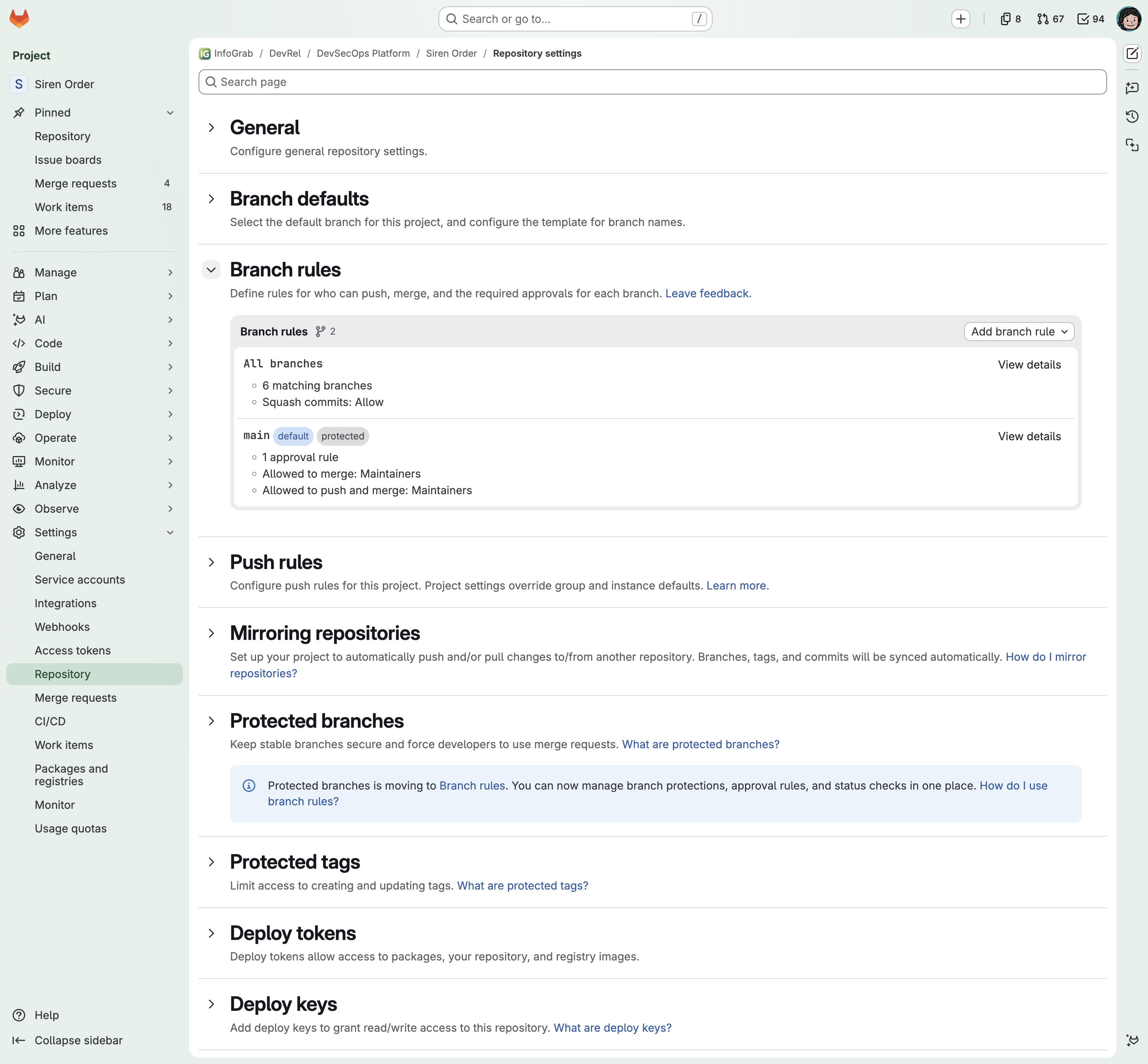
- 위치: Settings > Repository > Branch rules
- 이 프로젝트는 "All branches" 규칙과 "main" 규칙 2개가 있습니다. main은 protected 상태이며, 승인 규칙 1개, merge·push 권한은 Maintainers로 제한되어 있습니다.
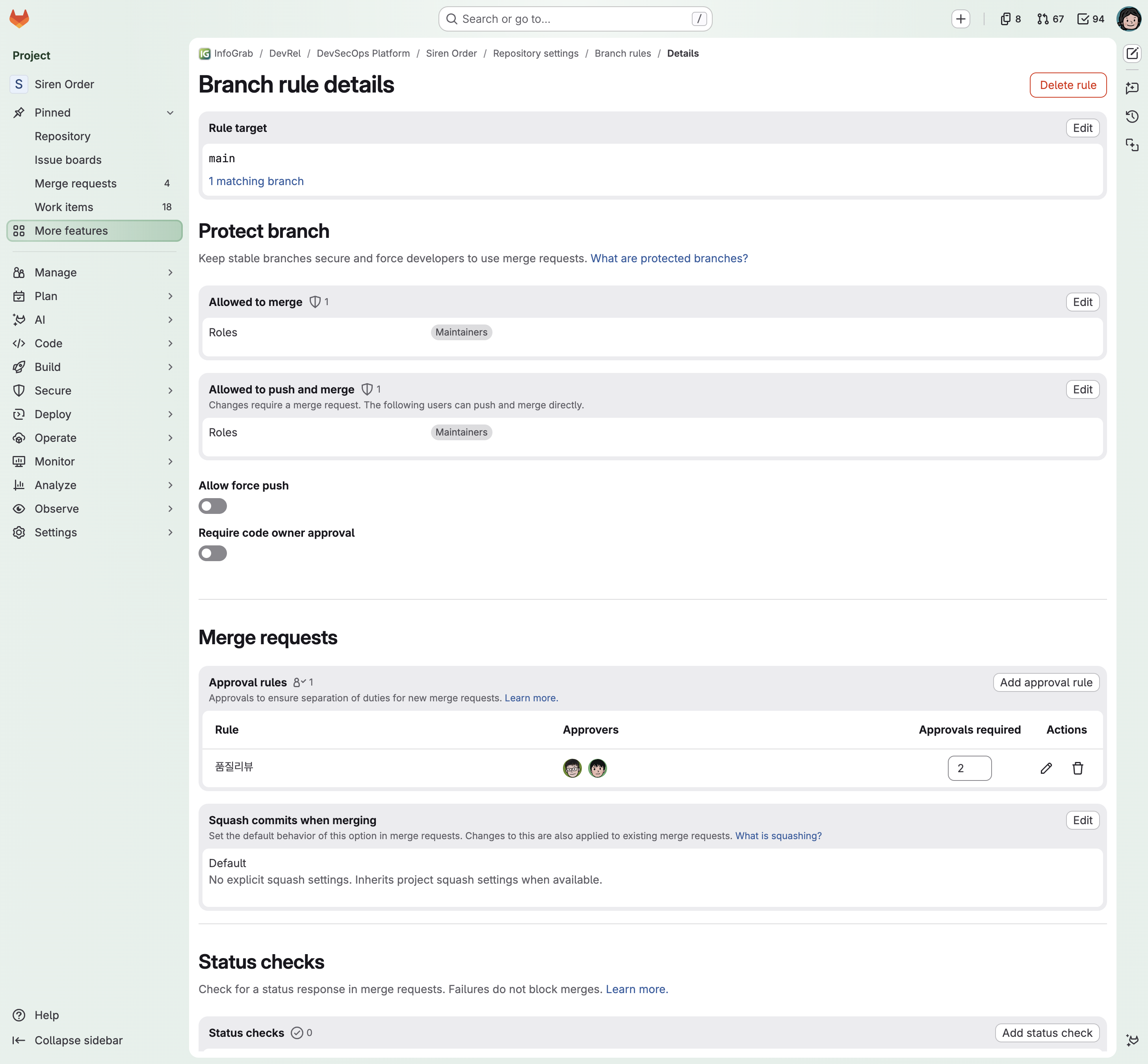
- main 규칙 상세입니다.
- Allowed to merge: Maintainers만 MR을 병합 가능
- Allowed to push and merge: Maintainers만 직접 push 가능
- Allow force push: OFF
- Require code owner approval: CODEOWNERS 승인 강제 토글 (Premium)
- 공식 문서가 권장하는 운영 예시는 다음과 같습니다.
- 운영(production) 브랜치: merge는 Maintainers, push and merge는 No one + Code Owner 승인 + 복수 승인
- 개발 브랜치: merge는 Developers + Maintainers, push and merge는 No one → 모든 변경을 MR 경유로 강제
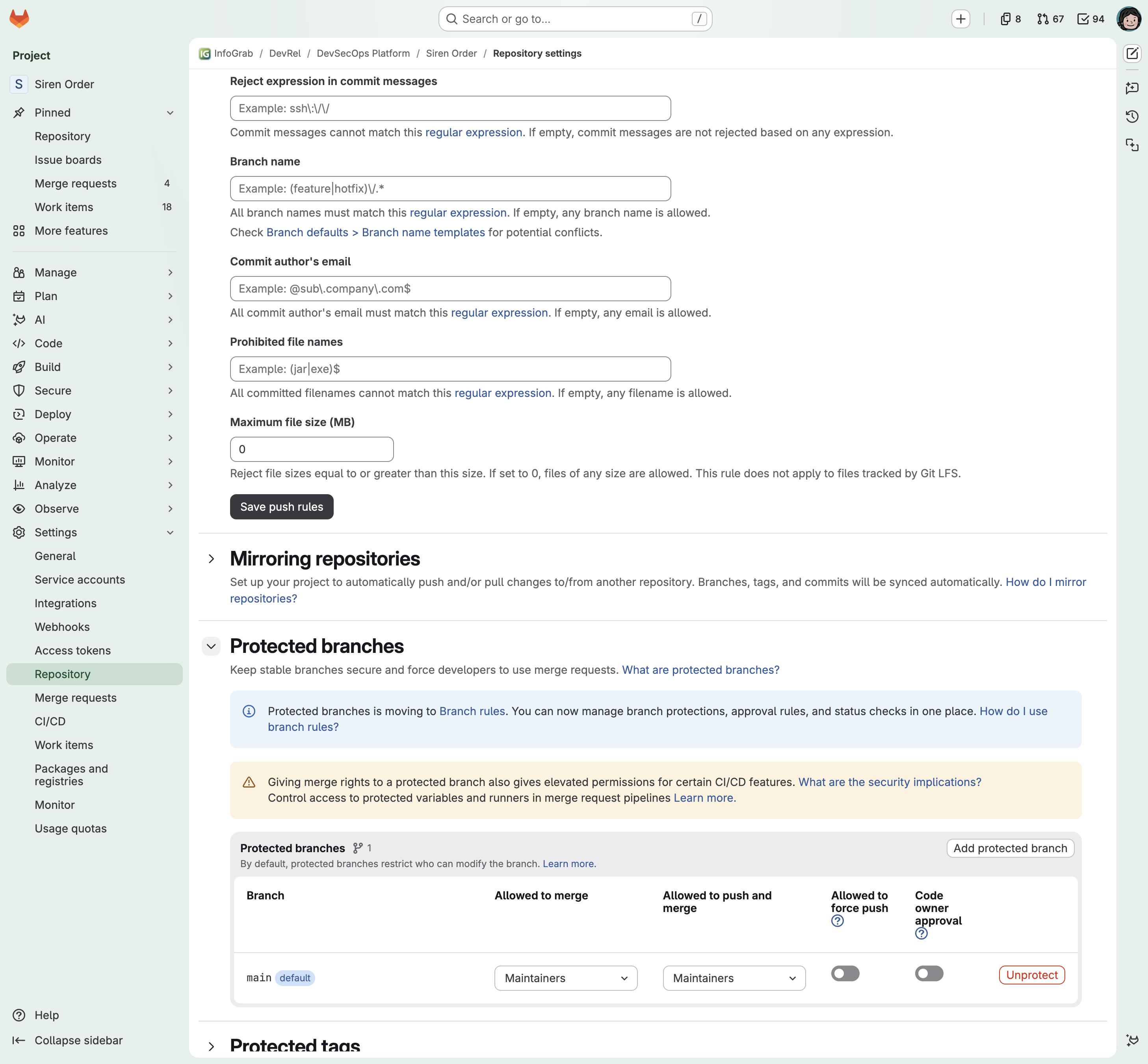
- 기존 "Protected branches" 메뉴는 Branch rules로 통합 이동 중이며, 같은 설정이 이관되어 표시됩니다. 최신 화면에서는 Branch rules가 정본입니다.
05-2. Push rules (Premium)
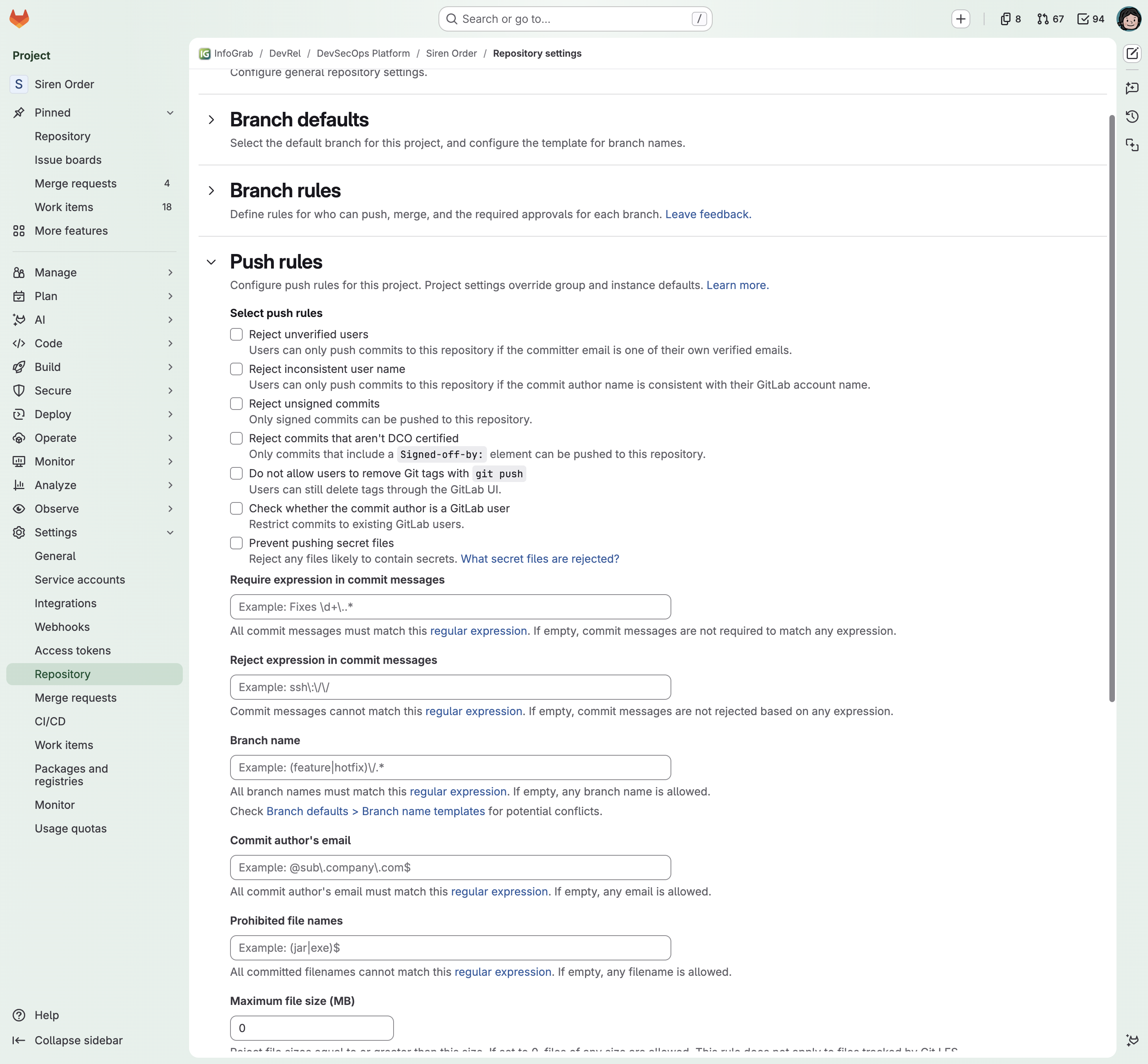
- 위치: Settings > Repository > Push rules
- pre-receive 훅 기반으로, push가 저장소에 수신되기 전에 커밋을 검사합니다.
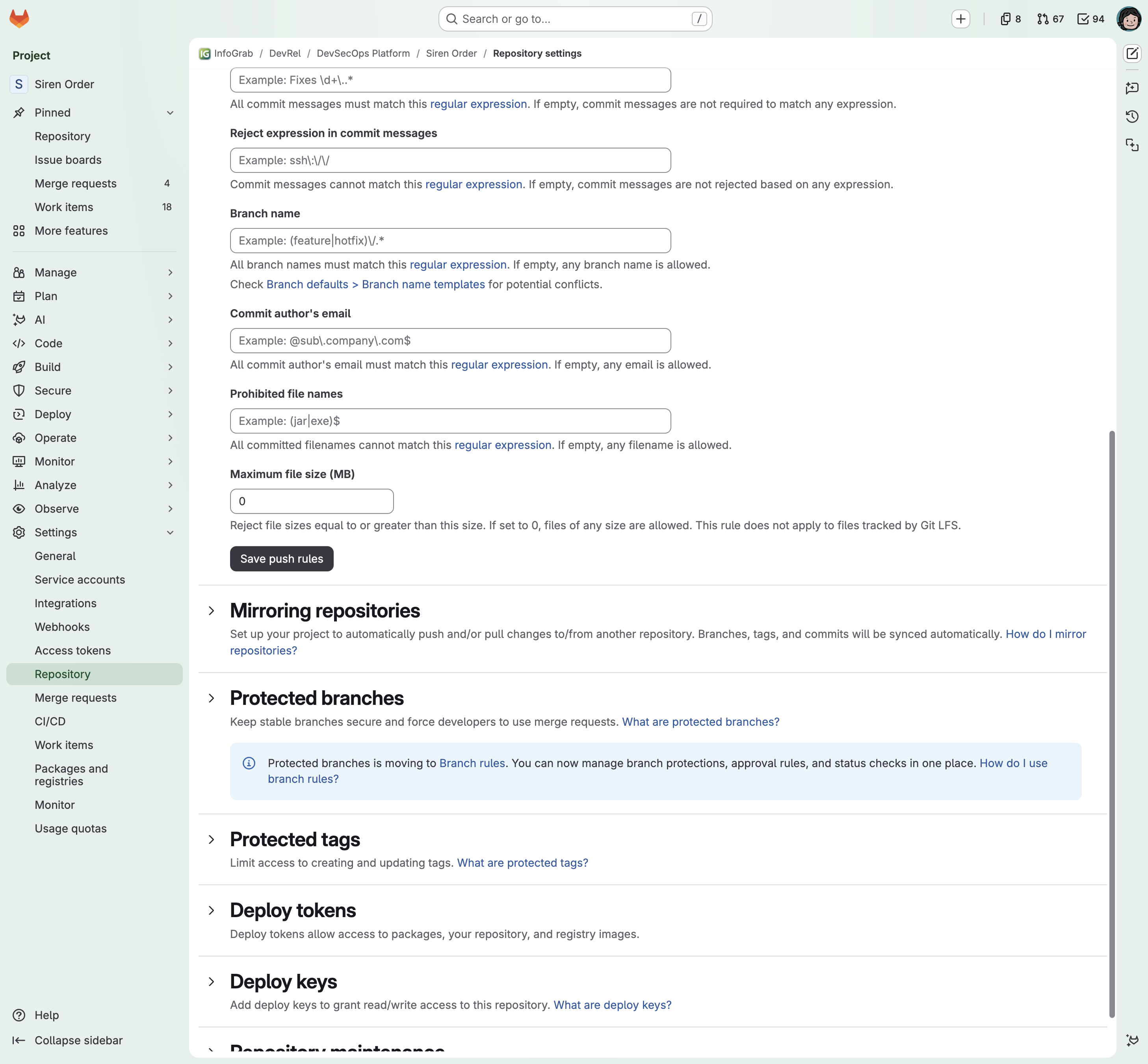
설정 가능한 규칙 전체
| 분류 | 규칙 | 설명 |
|---|---|---|
| 사용자 검증 | Reject unverified users | 커밋 작성자의 이메일이 GitLab 인증 이메일과 일치해야 함 |
| 사용자 검증 | Reject inconsistent user name | 작성자 이름과 계정명 일치 강제 |
| 사용자 검증 | Check whether the commit author is a GitLab user | 작성자가 실제 GitLab 사용자인지 검사 |
| 사용자 검증 | Commit author's email | 이메일 정규식 (예: 사내 도메인만 허용) |
| 커밋 메시지 | Require expression | 필수 정규식 (예: JIRA-\d+ 포함 강제) |
| 커밋 메시지 | Reject expression | 금지 정규식 |
| 브랜치 | Branch name | 브랜치명 정규식 (예: ^(feature|hotfix)/) |
| 파일 | Prevent pushing secret files | 비밀 파일 이름 패턴 차단 (.pem, *.key, id_rsa, .aws/credentials 등 사전 정의 목록) |
| 파일 | Prohibited filenames | 금지 파일명 정규식 |
| 파일 | Maximum file size | 최대 파일 크기(MB), 0이면 제한 없음, LFS 제외 |
| 무결성 | Reject unsigned commits | GPG/SSH/X.509 서명 커밋만 허용 |
| 무결성 | Reject commits that aren't DCO certified | Signed-off-by: 트레일러 강제 |
| 태그 | Do not allow users to remove Git tags | push로 태그 삭제 금지 |
주의할 동작 두 가지 (공식 문서 기준):
- Push rules는 템플릿 방식입니다. 인스턴스/그룹 규칙은 새 프로젝트 생성 시 복사되고, 이후 상위 규칙을 바꿔도 기존 프로젝트에 자동 반영되지 않습니다. 프로젝트에서 규칙을 삭제하면 상위 규칙으로 되돌아가지 않고 "규칙 없음"이 됩니다.
- 정규식은 RE2 문법이고 511자 제한이 있습니다.
05-3. Block secret push (Secret Push Protection, Ultimate)
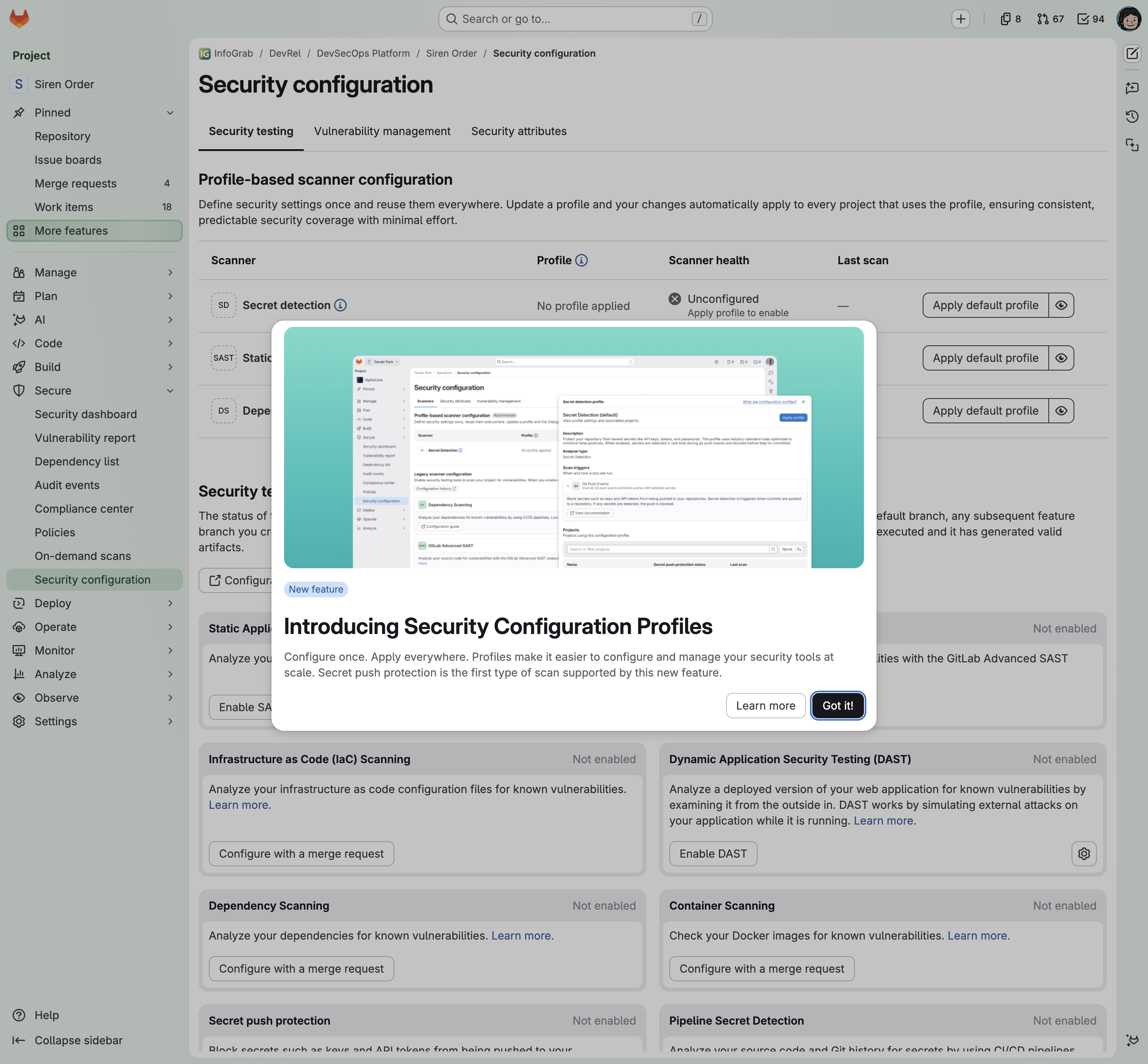
- 위치: Secure > Security configuration. 최신 버전은 Security Configuration Profiles로 대규모 적용을 지원합니다.
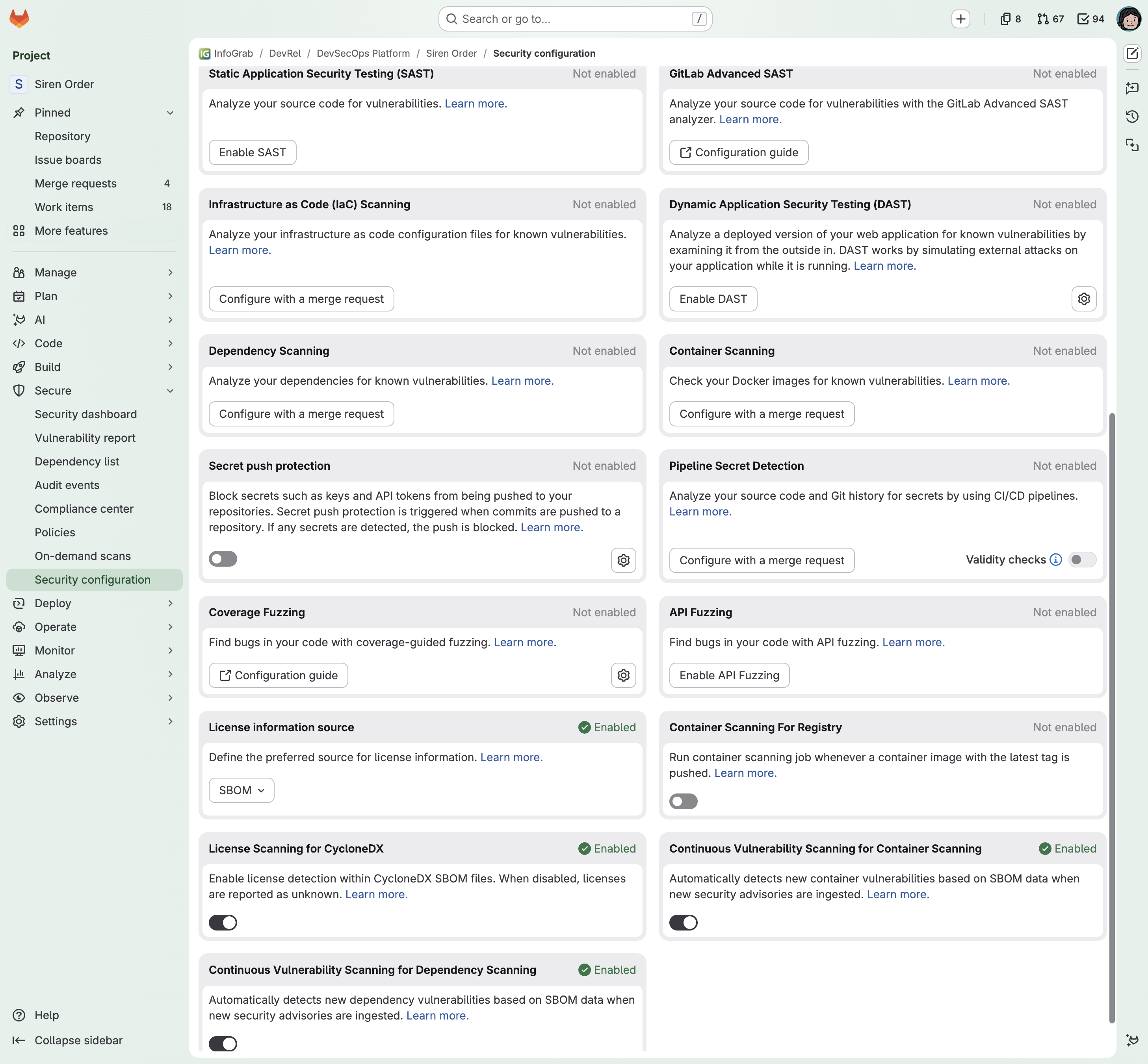
- "Block secrets such as keys and API tokens from being pushed to your repositories" — 토글 하나로 프로젝트에 적용됩니다.
동작 방식 (공식 문서 기준)
- 개발자가 push하면 pre-receive 단계에서 변경분(diff)을 스캔합니다.
- 비밀 값이 탐지되면 push가 차단되고, 커밋 ID·파일·라인·비밀 유형이 포함된 메시지를 돌려줍니다.
remote: PUSH BLOCKED: Secrets detected in code changes
remote: Secret push protection found the following secrets in commit: 37e54de5...
remote: -- test.txt:2 GitLab Personal Access Token
- Self-Managed/Dedicated에서는 관리자가 먼저 인스턴스에서 "Allow secret push protection"을 켠 뒤 프로젝트별로 활성화합니다. 그룹 API로 일괄 적용도 가능합니다.
알아둘 제한 사항
- 바이너리 파일, 1 MiB 초과 파일/diff, 이름만 바뀐 파일, 최초 저장소 생성 push는 검사하지 않습니다.
- 3,150개 경로 또는 350,000라인을 넘는 대형 push는 스캔을 생략합니다(skip). 이 경우 감사 이벤트가 남습니다.
git push -o secret_push_protection.skip_all또는 커밋 메시지의[skip secret push protection]으로 우회할 수 있고, 우회도 감사 이벤트로 기록됩니다.- Push rules의 "Prevent pushing secret files"(Premium)은 파일명만 보고, Secret Push Protection(Ultimate)은 내용을 봅니다. 둘은 보완 관계입니다.
참고 화면: 스캔 결과가 쌓이는 곳 (juice-shop)
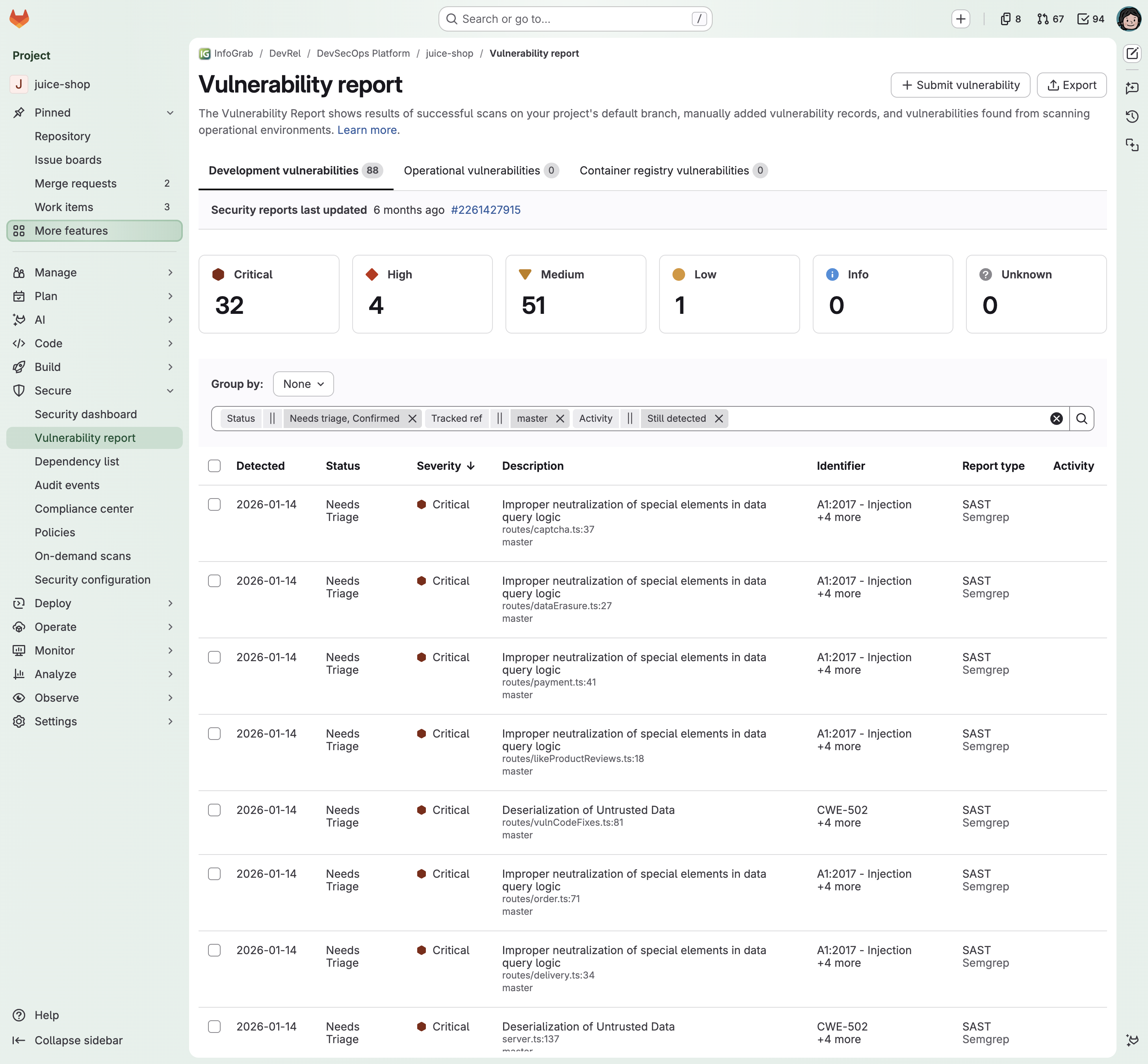
- Ultimate 환경에서 파이프라인 스캔 결과는 Vulnerability Report에 모입니다. juice-shop 예시는 SAST 88건(Critical 32 포함)이 탐지된 상태입니다.
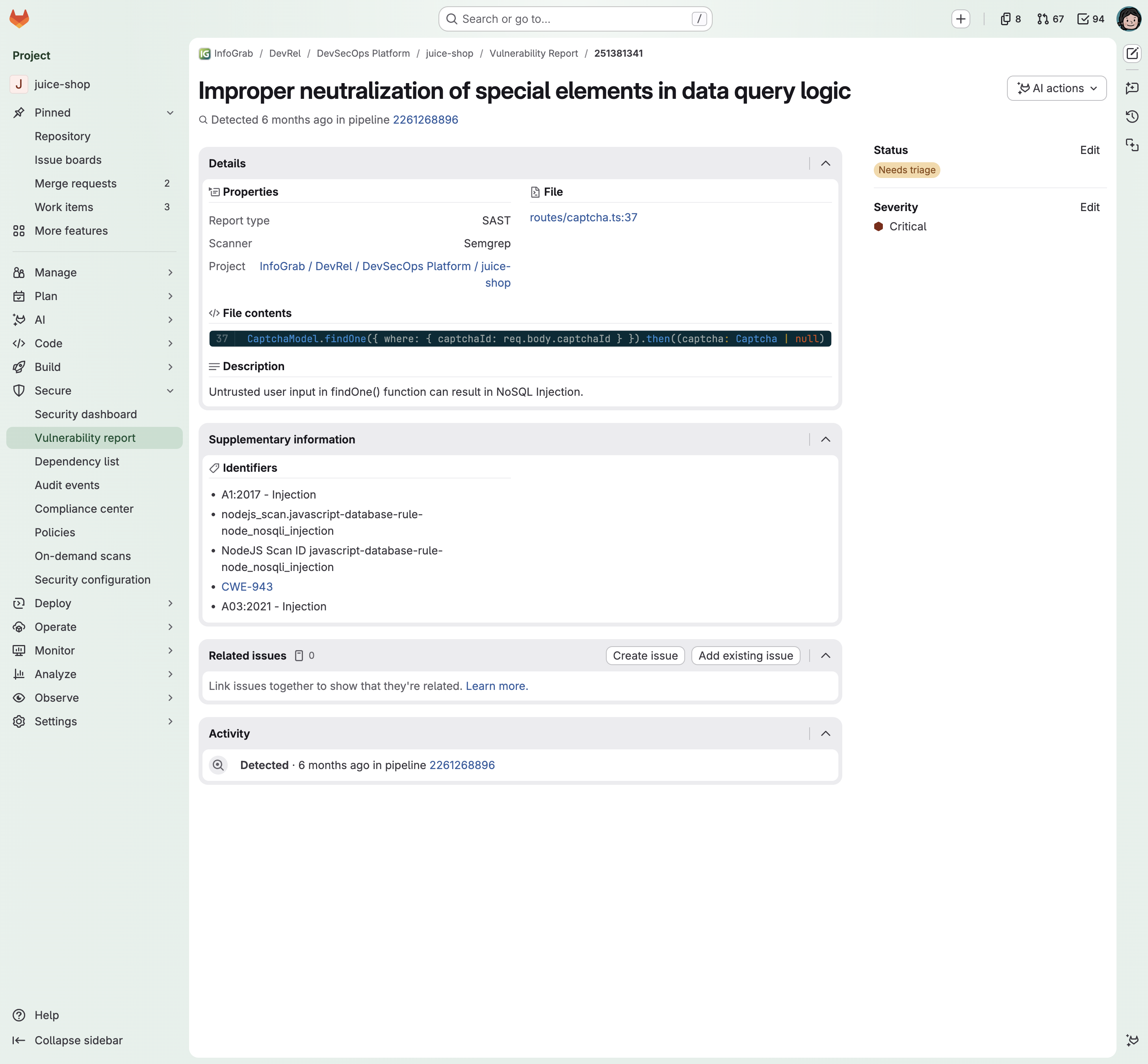
- 개별 항목을 열면 파일·라인, 식별자(CWE-943, A03:2021-Injection 등), 설명, 상태(Needs triage)와 심각도를 확인하고 이슈와 연결할 수 있습니다.
공식 출처
- Protected branches / Branch rules: https://docs.gitlab.com/user/project/repository/branches/protected/ (기본: Free부터, 그룹 지정·Code Owner 강제: Premium 이상)
- Push rules: https://docs.gitlab.com/user/project/repository/push_rules/ (Premium 이상)
- Secret push protection: https://docs.gitlab.com/user/application_security/secret_detection/secret_push_protection/ (Ultimate)